

Sanity CMS: The Complete Guide (2026)
October 1, 2026•4 min read

I hope you enjoy reading this post. If you want us to do your frontend development or design, click here.
Author: Alex Vasylenko | Founder of The Frontend Company
Reviewed by Pavlo Tyshchenko, COO, The Frontend Company

What is Sanity, exactly?
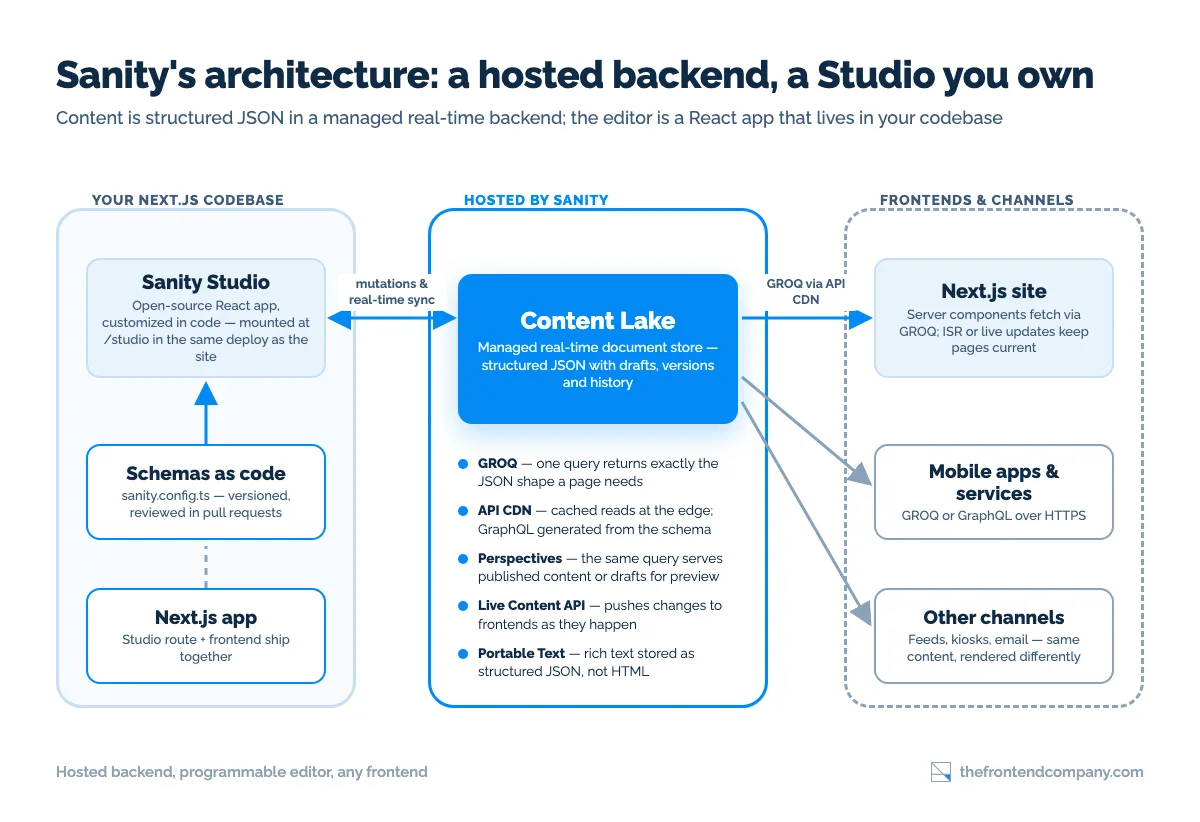
- The Content Lake - the hosted backend. Sanity calls it the real-time content database: every document is structured JSON you can query, patch, and subscribe to, with drafts, versions, and history kept for you. You never host or scale this part; Sanity does.
- Sanity Studio - the editor. Open source under the MIT license, React, yours. You define schemas in code, customize input components, add validation and previews, and deploy it wherever you like - including as a route inside the same Next.js app your frontend lives in.
How does the architecture work?
- Schemas as code. Content types are TypeScript or JavaScript definitions in your repo - versioned, reviewed in pull requests, portable between environments. No clicking a model together in an admin UI.
- GROQ. Graph-Relational Object Queries, Sanity's open-source query language: think “SQL for JSON documents” with projections - you describe the shape you want back, filters and joins across references included, in one request. Sanity's own docs make the point that you can often load the core content for a whole page in a single, cacheable query. There is a GraphQL API too - generated from your schema with one CLI command, read-only (writes go through the Mutation API) - but Sanity itself recommends trying GROQ first, and so do we.
- Portable Text. Rich text stored as structured JSON, not HTML - blocks, marks, and embedded objects you render however each channel needs. The same field can become React components on the web and plain text in a feed.
- Perspectives. Draft and published states are queryable perspectives - the same query returns published content for production or drafts for preview, no second code path. That is what makes live preview in Next.js straightforward: Sanity's Visual Editing and Presentation tool give editors click-to-edit overlays on the real site, and the Live Content API - available on every plan, including the free one - pushes changes to the frontend as they happen.
What does Sanity actually cost?
Plan | Price | Seats, datasets, documents | Included monthly usage | Above the quota |
|---|---|---|---|---|
Free | $0 forever | Up to 20 seats, 2 datasets (public only), 10k documents | 1M API CDN requests, 250k API requests, 100 GB bandwidth, 100 GB assets | Hard limits - no overage billing |
Growth | $15 per seat / month | Up to 50 seats, 2 datasets (private or public), 25k documents | Same quota as Free | Pay-as-you-go: $1 per 250k CDN requests, $1 per 25k API requests, $0.30 per GB bandwidth, $0.50 per GB assets |
Enterprise | Custom | Custom | Custom | SSO (SAML), uptime SLA, dedicated support, custom quotas and retention |
- Datasets are the expensive dimension. Both self-serve plans include two datasets; each additional one on Growth is a $999 per month add-on. Model your environments accordingly - most teams use drafts and perspectives for preview instead of a separate dataset.
- Document counts are a real ceiling. 10k on Free, 25k on Growth, 50k with the $299 per month Increased quota add-on (which also lifts you to 5M CDN requests, 1M API requests, and 500 GB each of bandwidth and assets). A large product catalog or a decade of news archives means the Enterprise conversation happens early.
- Usage scales with traffic, not with editors. Every uncached query on a Growth project is metered. The standard mitigation is the API CDN - useCdn: true in the client; cached responses aren't rate-limited and cost a tenth of a direct API request - plus static generation or ISR in front of it. With Next.js ISR in front, most marketing-site workloads sit comfortably inside the included quota. Model your query volume before committing, not after the first invoice.

Transform your UI for peak performance!
🔹
Unlock seamless, high-performance frontend solutions tailored to your business.
🔹
Get an interface that outshines competitors and delights your users.
Sanity vs Contentful: the short version
Sanity vs Payload: the short version
How do you start with Sanity? A quick-start path
- Scaffold. For a standalone Studio, run npm create sanity@latest. Inside an existing Next.js project, run npx sanity@latest init instead - the CLI detects the framework, creates or connects a Content Lake project, and scaffolds the Studio as a route in your app (default: /studio, a catch-all page rendering NextStudio from next-sanity) with sanity.config.ts at the project root.
- Define two or three schema types in code - a post, an author, a category - and watch the Studio build its editing UI from them. Add validation rules and a preview configuration while you're there; this is the taste part of the job.
- Open /studio, create the first documents, invite a second editor. Watch the presence avatars appear in the same document - that's the real-time collaboration, and it's a good moment to decide which roles your editors need.
- Query with GROQ from server components using the official client with useCdn: true for production reads, and wire draft preview through the drafts perspective. The next-sanity package's defineLive helper gives you sanityFetch plus a SanityLive component that keeps pages current through the Live Content API.
- Automate publishing. Set up GROQ-powered webhooks (two on Free, four on Growth) or ISR revalidation so a publish updates the site without a redeploy.
Honest review: strengths and trade-offs
- The most programmable editing environment in the hosted-CMS class - the Studio is a React app you own, not a settings page.
- GROQ's expressiveness: one query, one round-trip, exactly the JSON shape the component needs.
- Native real-time collaboration and a hosted backend you never patch.
- Schemas in version control, Portable Text keeping rich content truly structured, and a free tier you can ship real things on.
- GROQ is a new language for the team - budget a week or two for the ramp.
- A fully custom Studio is power that takes engineering hours to exercise well; the defaults are good, the great setups are built.
- Usage-based pricing needs modeling at traffic, and the dataset and document ceilings arrive earlier than a seat-based plan suggests.
- Content lives in Sanity's cloud. Sanity's security page describes a backend running on Google Cloud in a single EU region (Belgium), with content stored in the EU/EEA or the US depending on the customer and customer-controlled data placement still on the roadmap. Fine for most teams; a strict data-residency requirement is a conversation with Sanity's sales before you commit, not after.
When is Sanity the right choice?
- Pick Sanity when developers own the content architecture, you want real-time collaborative editing, and you value a customizable Studio living in your codebase with a managed backend behind it.
- Pick Contentful when a large editorial organization needs mature workflows, roles, and localization out of the box.
- Pick Payload when you're rebuilding in Next.js anyway and want the CMS self-hosted, open-source, with no per-seat fees.
Evaluating Sanity for your product?
FAQ


Alex Vasylenko is the founder of The Frontend Company, DBC and several other successful startups. A dynamic tech entrepreneur, he began his career as a frontend developer at Deloitte and Scandinavia's largest banking company. In 2023, Alex was honored as one of 'Top 10 Emerging Entrepreneurs' by USA Today.


REVIEWED BY
COO, The Frontend Company
Pavlo runs operations and delivery at The Frontend Company and builds its internal AI systems - agent workflows, automation, and the engineering side of software compliance.