




Headless CMS agency · senior React & Next.js engineersHeadless CMS development company · senior React & Next.js engineersStoryblok agency · senior React & Next.js engineersStrapi agency · senior React & Next.js engineersCMS migration services · senior React & Next.js engineers

Headless CMS development services for SaaS and product teams

We choose the headless CMS with you, model your content and build the React or Next.js front end, or move your site to it from WordPress, Contentful or Drupal.We build on Storyblok: the content model, the components your editors build pages from, and the React or Next.js site on top.We build on Strapi: content types, roles and the admin your editors use, self-hosted under your control, with the React or Next.js site on top.Moving from WordPress, Contentful, Drupal or a monolith to a headless CMS? Content moves by script, and we rebuild the front end in React or Next.js. Every URL is kept or redirected.

Get your CMS plan
  • Contentful, Sanity, Payload, Storyblok or Strapi, chosen for your editors
  • Content moved by script, every page compared before the switch
  • Editors preview and publish pages without a developer ticket
  • 6 hours of overlap with your working day, US Eastern
Pavlo Tyshchenko, COO

30-minute call with Pavlo, our COOWe reply within one business day.

Get your headless CMS plan

A 30-minute call with Pavlo, then a written plan with the CMS, scope, team, timeline and price within 3–5 business days of our first call, at no cost.

Helpful to include: number of editors, languages, rough page count and your deadline.

We store your info in our CRM to reply. Privacy policy.

TracesafeLeafworksSkillDirectorCarmenBring LieselQuik
What you get

What your headless CMS plan looks like

The plan maps your content before anyone picks a platform. If you are moving from another CMS, it also lists every URL and where it goes.

Excerpt from a plan: your content modelSample for illustration only: made-up content types, not client data.
Content typeBuilt fromWho editsWhere it shows
Landing pageHero, feature grid, logos, FAQ, form sectionsMarketing/, /product/*
Blog postTitle, rich text, author, category, SEO fieldsContent team/blog/*
Customer storyQuote, results, logo, related postsMarketing/customers/*
NavigationMenus, footer links, announcement barMarketingEvery page
For a move: the redirect map you approveSample for illustration only: made-up URLs, not client data.
Old URLNew URLDecision
/services/consulting//services/consulting/Keep
/?p=1234/blog/annual-report/301
/node/482/customers/acme/301
/en-US/pricing/pricing301
Proof

Work we can show you

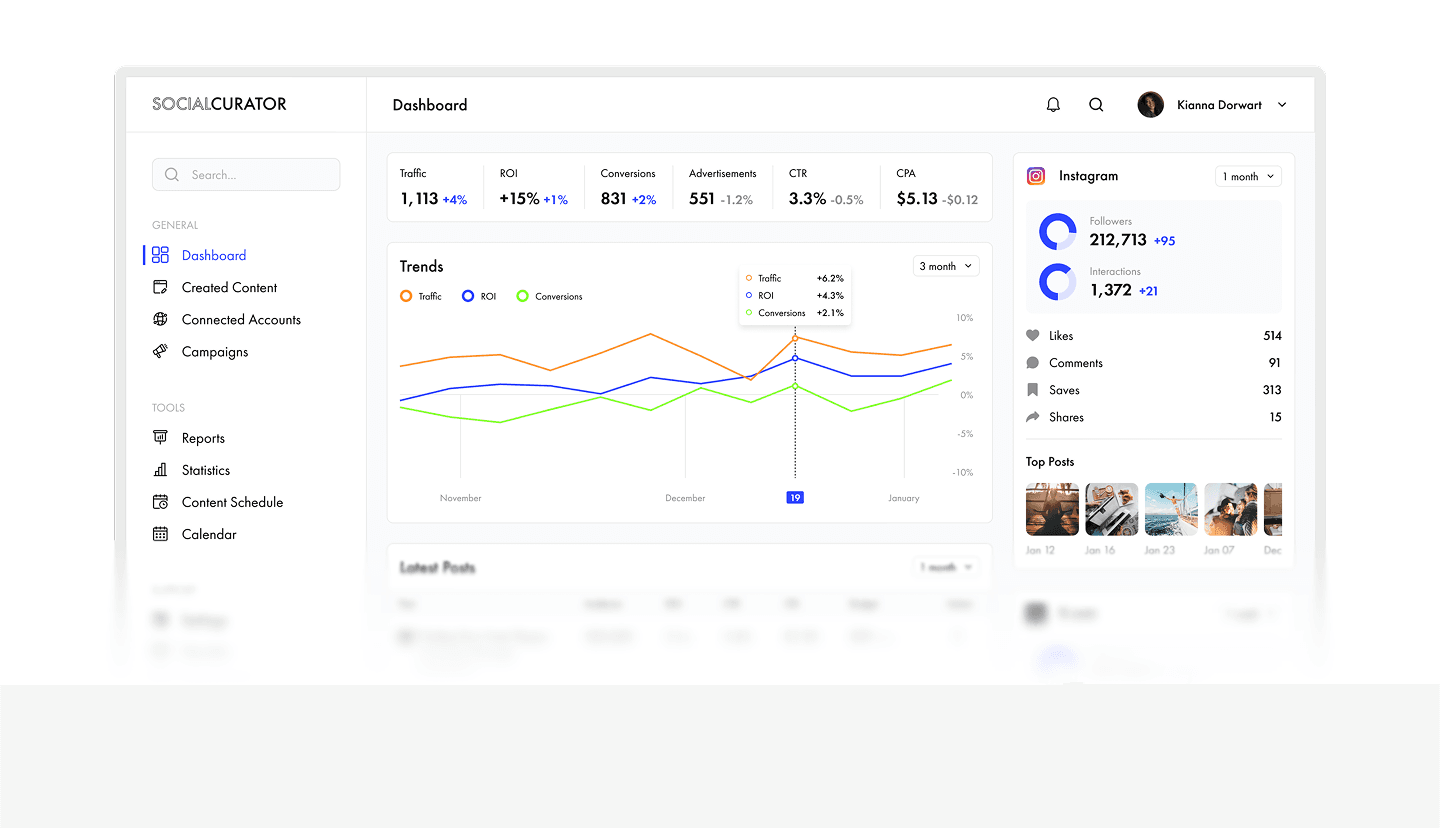
The closest case we can publish: a customer dashboard taken out of WordPress views and rebuilt as a standalone React app, launched in one switch-over.

All case studies
Front end decoupled from WordPress

Social Curator: WordPress Dashboard to React App

Social Curator’s customer dashboard lived inside WordPress as a set of views, so every new screen waited on CMS templates. We rebuilt the views as a standalone React application on Firebase, with the same data and the same jobs to be done.

  • The dashboard moved out of WordPress views into a standalone React app
  • Delivered as a complete replacement and switched over in one go
“We were able to launch our new website with the flick of a switch.”
Jacob Berg, CTO at Social Curator, on Clutch
Read the Social Curator case study
Which CMS

Choosing a headless CMS: the options we build on

Platform choice is case by case: it depends on who edits the content, how many locales you run and who will host what. We are not a partner of any CMS vendor, so the recommendation is not tied to one.

  • Contentful

    What it is good at
    An enterprise SaaS CMS with REST and GraphQL APIs, an app framework and strong localization.
    What to plan for
    Plan limits on users, locales and spaces, and a price that is set again at every renewal.
    Best when
    Several editors, locales or spaces, and workflows you rely on.
  • Sanity

    What it is good at
    A hosted editor: Sanity Studio, a React app we customize and can embed in your Next.js project, with real-time collaborative editing.
    What to plan for
    Paid plans priced per seat, and schema changes that go through a developer.
    Best when
    Non-technical editors want a hosted editor and structured content.
  • Storyblok

    What it is good at
    Visual editing: editors build pages from components and see the page while they edit it.
    What to plan for
    A SaaS plan of its own, so we price it next to your current CMS bill.
    Best when
    Marketing-heavy teams that build many pages themselves.
  • Payload

    What it is good at
    Open source and self-hosted, with no per-seat fees. Payload v3 installs inside your Next.js app: one codebase, one deploy.
    What to plan for
    The database and backups to run, by your team or by us.
    Best when
    You want no license fee and the CMS inside the Next.js codebase.
  • Strapi

    What it is good at
    An open-source, self-hosted Node.js CMS with a familiar admin panel, run as a separate service you control.
    What to plan for
    Major-version upgrades, which can touch custom plugins.
    Best when
    You want a separate CMS service under your own control.
  • Headless WordPress

    What it is good at
    The editor most marketing teams already know, behind your Next.js front end.
    What to plan for
    WordPress hosting and plugin updates.
    Best when
    Content-heavy sites whose editors already know WordPress.
  • Content in git + Next.js

    What it is good at
    No CMS license and no extra service: Markdown, MDX or JSON files in your repository, edited in pull requests. This website works that way.
    What to plan for
    No visual editor for non-technical people.
    Best when
    Engineering-led teams. If non-technical editors publish daily, one of the options above usually fits better.
CMSWhat it is good atWhat to plan forBest when
ContentfulAn enterprise SaaS CMS with REST and GraphQL APIs, an app framework and strong localization.Plan limits on users, locales and spaces, and a price that is set again at every renewal.Several editors, locales or spaces, and workflows you rely on.
SanityA hosted editor: Sanity Studio, a React app we customize and can embed in your Next.js project, with real-time collaborative editing.Paid plans priced per seat, and schema changes that go through a developer.Non-technical editors want a hosted editor and structured content.
StoryblokVisual editing: editors build pages from components and see the page while they edit it.A SaaS plan of its own, so we price it next to your current CMS bill.Marketing-heavy teams that build many pages themselves.
PayloadOpen source and self-hosted, with no per-seat fees. Payload v3 installs inside your Next.js app: one codebase, one deploy.The database and backups to run, by your team or by us.You want no license fee and the CMS inside the Next.js codebase.
StrapiAn open-source, self-hosted Node.js CMS with a familiar admin panel, run as a separate service you control.Major-version upgrades, which can touch custom plugins.You want a separate CMS service under your own control.
Headless WordPressThe editor most marketing teams already know, behind your Next.js front end.WordPress hosting and plugin updates.Content-heavy sites whose editors already know WordPress.
Content in git + Next.jsNo CMS license and no extra service: Markdown, MDX or JSON files in your repository, edited in pull requests. This website works that way.No visual editor for non-technical people.Engineering-led teams. If non-technical editors publish daily, one of the options above usually fits better.

Not sure which row is yours? Get your CMS plan · More on each platform: Contentful development, Sanity development, Payload development, and our comparison of headless CMS agencies.

Fit check

Who this is for, and who it is not for

A headless CMS pays off when editors publish often and the site matters to the business. It is overkill for some sites, so here is the line we draw before the first call.

A good fit

  • A company website or content hub where marketing waits on developers for every page
  • Choosing a headless CMS, and wanting the reasons and running costs in writing
  • Moving from WordPress, Contentful, Drupal or a monolith, with every URL kept or redirected
  • A headless site already live that needs a better content model, front end or a team to keep building it

Not what this page is for

  • A CMS vendor’s own docs, pricing or login: those are on the vendor’s site
  • A small site nobody edits: static content in git may be cheaper, and we will say so
  • Moving a WordPress site to another host: hosting companies and migration plugins do that well
  • Jobs at The Frontend Company: our career page

Not sure which side you are on?

That is what the first call is for: 30 minutes with Pavlo, our COO, and a straight answer, including when a headless CMS is not worth it for your site.

Get your CMS plan
Services

Headless CMS development services

From choosing the platform to the work after launch, one senior team builds the CMS setup and the front end together.

Choosing a headless CMS

We compare the platforms that fit your editors, locales, hosting and budget, and write down why one wins, with what each costs to run. If the CMS you have is the right one, the plan says so.

Content modeling

Content types, reusable page sections, references, roles and locales designed around how your team publishes, so editors assemble pages without a developer ticket and the API stays lean.

React and Next.js front end

The site that renders your content, built by senior React and Next.js engineers: draft previews on the real site, static pages that update when editors publish, and SEO fields editors control.

Migration to a headless CMS

From WordPress, Contentful, Drupal or a monolith: content moved by script, rich text converted, assets re-hosted, every URL kept or redirected and every page checked before the switch.

Integrations

Forms, search, analytics, translation tools and your product’s own APIs, connected to the CMS and the site through webhooks and APIs.

Ongoing development

After launch we keep building: new sections and content types, performance work, CMS upgrades and fixes, by the engineers who built the site.
From WordPress, Contentful or Drupal

CMS migration services: moving to a headless CMS

Content moves by script, never by copy-paste, and your editors keep publishing until a short content freeze agreed in advance. A monolith where content and code live together moves the same way.

Every URL

Each live URL keeps its address or gets a 301 to its exact new home, from a redirect map you approve before launch.

Search signals

Titles, canonicals, hreflang and structured data move with the content and are compared page by page.

Content and rich text

Rich text is converted to the new CMS’s format, references and embedded entries are resolved, and entry counts are reconciled per content type and locale.

Images and files

Assets are re-hosted and every reference in the content is rewritten. Alt text and file names come along.

Your editors’ workflow

Preview and roles are rebuilt in the new CMS, and editors try it on staging with real content before the switch.

Cutover

The current site keeps serving until cutover, and cutover is a normal deploy with a way back.

You approve the redirect map before launch, and you get the parity report before the switch. Leaving a specific CMS? WordPress to headless and Contentful migration.

Get your CMS plan
How it starts

The first step costs you nothing

  1. A 30-minute call with Pavlo, our COO

    Your site, your editors, the CMS you are on or considering, what is slow today and how much organic traffic is at stake.

  2. A draft discovery of your project

    After the NDA we review what you can share: the current CMS and content types, the front-end code, the designs, the backlog and, for a move, the list of indexed URLs.

  3. Your headless CMS plan, in writing

    The CMS and why, content model and migration scope, team, timeline and price, within 3–5 business days of our first call, and whether going headless is worth it for you at all.

Everything up to the headless CMS plan is at no cost. If your project needs a full Discovery phase (workshops, architecture, a detailed backlog), that is a separate, paid phase: the plan says so, with its own scope and price, and you decide whether to start it.

Get your CMS plan
Process

How a headless CMS project runs after the plan

The same order for a new build and for a move: the content model first, then the front end, then the content, checked page by page before anything switches.

  1. 01

    Content model and CMS setup

    What you get: a content model and, for a move, a redirect map you approve.

    How this step works
    Content types, page sections, roles, locales and previews are set up in the chosen CMS with your editors, not for them. For a move, every old field is mapped to its new home and URL rules are decided before any content moves.
  2. 02

    Front end build

    What you get: a staging site on real content that your editors have used.

    How this step works
    Senior React and Next.js engineers build the site against the new CMS, with a demo every week and a preview deployment for every pull request, so you review working software, not status reports.
  3. 03

    Scripted migration and parity checks

    What you get: a reconciliation report and a parity report where every difference is fixed or explained.

    How this step works
    Content moves by script and the scripts can rerun at any time, so editors keep publishing in the old system while we work. Every URL is rendered on the old and the new site and compared, and redirects are tested one by one.
  4. 04

    Launch and ongoing development

    What you get: the live site, a rollback plan and a team that stays on.

    How this step works
    A short content freeze agreed in advance, a final migration run, then the switch as a normal deploy with a way back. After launch we watch Search Console for 404s and indexing changes and keep building the site with you.
The Frontend Company in numbers
SaaS products delivered
100+
on Clutch from 30 reviews
5.0/5
industry awards
16
of experience, every engineer
5+ years
Before you share code

What your security and legal teams will ask

Will you sign an NDA?
Yes. We sign an NDA before you share any code, designs or access, so the first review is already covered by it.
Who owns the code and the IP?
You do. The contract assigns all intellectual property to you, and we work in your repositories under your accounts from the first commit.
Are we locked in to you?
No. Documentation, tests and the design system are part of every delivery, so your own team or another vendor can take over at any point.
Which hours do you work?
Our engineers work in European time zones and keep 6 hours of overlap with your working day, US Eastern. Stand-ups, demos and reviews happen inside that overlap.
Testimonials

What our clients say

5.0/5 · Read all 30 reviews on Clutch(opens in a new tab)
Questions?

FAQ

Pavlo Tyshchenko, COO

30-minute call with Pavlo, our COOWe reply within one business day.

Get your headless CMS plan

A 30-minute call with Pavlo, then a written plan with the CMS, scope, team, timeline and price within 3–5 business days of our first call, at no cost.

Helpful to include: number of editors, languages, rough page count and your deadline.

We will add your info to our CRM for contacting you regarding your request. For more info please consult our privacy policy.

Keep exploring

Related services and reading