Application modernization is the work of updating a legacy application's architecture, technology stack, and user experience so it can keep shipping features safely - without throwing away the business logic that makes it valuable. It ranges from rehosting an app unchanged on new infrastructure to rebuilding it from scratch, and the seven approaches in between are where the real decisions live. The honest one-liner from a team that has modernized applications running 10-20-year-old systems: most modernization projects don't fail on technology. They fail on scope - someone decides to rewrite everything at once, and the business can't survive the freeze.
This guide covers when you actually need modernization, the approaches and how to pick one per module, the frontend-first path that de-risks most projects, how AI tooling changed the economics, what drives cost and timeline, and the mistakes that sink these projects. The same playbook applies whether the application runs your internal operations or is the thing you sell - in the second case teams usually call it software product modernization.
When do you actually need application modernization?
The real triggers are measurable, and they're rarely “the UI looks dated”:
Velocity collapse. Features that took a sprint take a quarter; every change breaks something two modules away. The codebase is charging interest on its debt - and the interest is not small: in Stripe's Developer Coefficient survey, the average developer already spends more than 17 hours of a 41-hour week on maintenance - debugging, refactoring, dealing with bad code - before any legacy multiplier.
Hiring drought. Nobody wants to work in the stack, and the engineers who know it are leaving or retiring. Every year the maintenance pool shrinks and its price rises.
Security and compliance findings. Unsupported components, unpatchable dependencies, and the EU's product-security rules - the Cyber Resilience Act above all - turning technical debt into regulatory exposure.
Product mismatch. Users expect experiences the architecture can't deliver - multi-channel, real-time, mobile - and workarounds cost more than the fix.
The false triggers: “it looks old” (that's a redesign, maybe), a new CTO wanting their stack, and the general anxiety that comes from reading about microservices. If the app ships reliably and the team is productive, the honest advice is leave it alone.
A useful self-check before anyone says the word “modernization”: count the real triggers above that you can back with a number - lead time per feature, open positions unfilled for the stack, unpatched CVEs, support tickets caused by the UI. One trigger with evidence is a conversation; three is a program. None is a redesign request wearing a bigger budget.
The seven approaches - decided per module, not per app
The classic taxonomy gives seven options. The mistake is picking one for the whole application; the right answer is usually different for different modules.
Approach
What it means
Fits when
Risk
Rehost
Move as-is to new infrastructure (cloud)
Infra is the cost problem, code is fine
Low
Replatform
Minimal changes to run on a modern platform
Quick wins on ops, no architecture change needed
Low
Refactor
Restructure code without changing behavior
Logic is sound, maintainability is the issue
Medium
Rearchitect
Change the architecture (monolith → services, new UI layer)
Structure blocks scale or speed
Medium-high
Rebuild
Rewrite from scratch, keep the spec
Small app or dead stack, little to preserve
High
Replace
Swap for a commercial/SaaS product
The app isn't your differentiator
Medium
Retain
Leave it, contain it, plan
Stable, low-change, not worth the spend yet
Grows over time
Three questions decide the approach for each module. Does it differentiate the product, or is it commodity (billing, auth, notifications)? Commodity leans to replace or rehost; differentiating logic leans to refactor or rearchitect, because that is the code nobody else will write for you. How coupled is it - can it be carved out behind an interface, or does it share tables and session state with everything else? And how much is it expected to change in the next two years? A module nobody will touch is a retain candidate however ugly it looks; a module with a feature backlog is where refactoring pays back fastest.
Real projects mix these: rehost the backend, rearchitect the UI layer, retain the reporting module for another year, replace the auth system with a managed service. Writing that mix down is the planning step most teams skip - our application modernization strategy template is the one-page version, and the modernization roadmap guide turns it into dated phases. The patterns for sequencing the mix - which module goes first, what gets contained, when a rebuild is honestly cheaper - are a guide of their own: legacy application modernization strategies, which we cover separately.
Why frontend-first modernization is usually the right start
The pattern we've seen hold across ten-plus years of legacy SaaS: the backend is often fine - stable, tested, encoding years of domain rules - while the UI layer is where users feel the age, where the EOL framework lives, and where hiring hurts most. That makes the frontend the highest-ROI, lowest-risk place to begin.
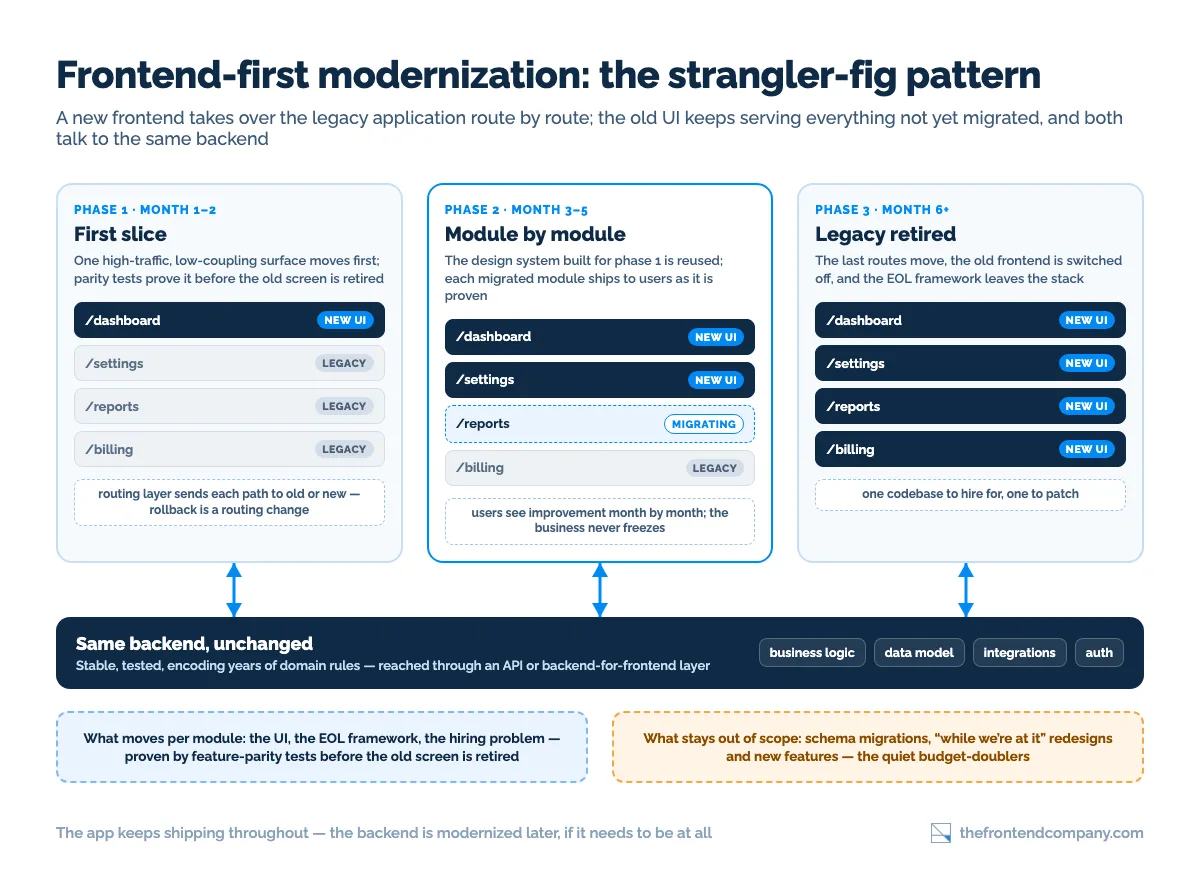
The mechanics are the strangler-fig pattern Martin Fowler named after the vine that grows around a host tree: a new frontend (React or Next.js, say) grows alongside the legacy one, taking over routes and modules incrementally while the old UI keeps serving everything not yet migrated. Users see improvement month by month; the business never freezes; rollback is a routing change.
Two variants cover most legacy frontends. Incremental framework migration keeps one application shell and moves screens from the old framework to the new one behind the same router - the AngularJS-to-Angular hybrid is the textbook case, and the same shape works from a server-rendered template stack to React. Micro-frontends go a step further and let separately deployed frontends own separate routes or page regions, which is the right tool when several teams need to ship independently or when the legacy UI cannot be loaded inside a modern shell at all. Micro-frontends buy autonomy at the price of integration work - shared design tokens, a shell, cross-app navigation - so for a single product team the incremental migration is usually enough.
What makes it work in practice: an API or backend-for-frontend layer that lets the new UI talk to the old backend cleanly; a design system built once and reused across both old and new screens during the transition; and feature-parity tests so a migrated screen is provably equivalent before the old one is retired. For framework-specific paths, our AngularJS to Angular migration guide covers the Angular lane and React migration services the React one; even content-first systems follow the same logic, as in WordPress to React. For what the result looks like at product scale, our application modernization examples walk through how five SaaS leaders rebuilt their interfaces without pausing their roadmaps.
How AI tooling changed the modernization math
The slow, expensive phases of modernization used to be archaeology: mapping dependencies, finding dead code, understanding what a 2014 module actually does. AI-assisted code analysis compresses that - dependency graphs, technical-debt hotspots, and refactoring candidates surface in days instead of months, and modern component equivalents of legacy UI patterns can be generated for engineers to review, refine, and integrate.
The honest limits: generation is a draft, not a deliverable. Domain rules hidden in legacy code need humans who understand the business; parity still has to be tested; and architecture decisions don't come from a model. The economics shifted - a senior team with agentic tooling covers more ground - but the judgment didn't move.
Transform your UI for peak performance!
🔹
Unlock seamless, high-performance frontend solutions tailored to your business.
🔹
Get an interface that outshines competitors and delights your users.
Discovery and assessment. Architecture review, dependency and debt mapping, stakeholder interviews - producing a feasibility picture with gains and risks before anyone commits budget. A frontend audit is often the cheapest version of this step.
Roadmap. Per-module approach decisions, sequencing by business value and risk, milestones with real effort ranges.
Incremental delivery. Strangler-fig execution, parity tests per module, continuous releases - the app keeps shipping throughout.
Stabilize and hand over. Documentation, team enablement, monitoring - modernization that only the vendor understands isn't finished.
The step teams underestimate is the first one. An assessment that ends in a slide deck is not an assessment; it should end in a dependency map you can point at, a list of modules with an approach and a risk rating each, and at least one candidate for the first slice - small enough to ship in weeks, visible enough that the business notices. That first slice is also where the design system and the parity-test harness get built, which is why it takes longer than its size suggests and why every slice after it is faster.
What drives cost and timeline?
Not lines of code. The variables that actually move the number:
No tests means parity has to be built before it can be verified
Documentation and knowledge
Undocumented business rules cost archaeology time; departed engineers cost more
Scope discipline
“While we're at it” redesign and new features double budgets quietly
Integrations
Every external system is a contract to preserve
Data model changes
Schema migrations touch everything; UI-only modernization avoids them
Rough shapes: a focused frontend modernization of one surface runs weeks; a full UI-layer migration of a mid-size SaaS runs a few months in phases; a full-stack rearchitecture is a multi-quarter program. Anyone quoting a number before seeing the codebase is quoting their hopes. The build-vs-partner decision for this kind of spike is its own question - in-house vs outsourcing is the honest version of it.
The big-bang rewrite. The second system takes twice as long, the business freezes, feature parity becomes a black hole, and the old app stays in production for years “temporarily.”
Modernizing without an assessment. Picking an approach before mapping the system - the roadmap gets rewritten in month three.
Scope creep disguised as modernization. Redesign, new features, and a data-model overhaul folded into “the migration.”
No parity tests. Migrated modules that behave slightly differently; users find the differences, not QA.
Losing domain knowledge. The one engineer who knew the billing module leaves mid-project - capture rules before touching code.
No end date for containment. “Retain” becomes permanent and the debt keeps compounding.
The containment moves are unglamorous and they work: a written scope that names what is not in the migration, a parity-test suite that gates every retired screen, a knowledge-capture pass with the longest-tenured engineers before the first line changes, and a review date on every “retain” decision. Modernization fails quietly, in month seven, when nobody can say which of those four was skipped - so put them in the roadmap as deliverables, not intentions.
Modernizing a legacy application?
We start with an assessment of your actual codebase and give you a roadmap with real effort ranges - including when the honest answer is to contain and wait. Book a call and bring the app you're worried about.
FAQ
Updating a legacy application's architecture, technology stack, and user experience so it can keep evolving safely - while preserving the business logic that makes it valuable. It spans a range from rehosting on new infrastructure to incremental rearchitecture, chosen per module rather than for the whole app at once.
Depends on scope and coupling: a focused frontend modernization of one surface takes weeks, a full UI-layer migration for a mid-size SaaS takes a few months in phases, and full-stack rearchitecture is a multi-quarter program. Incremental delivery means value lands throughout rather than at the end.
The drivers are coupling, test coverage, documentation, scope discipline, integrations, and whether the data model changes. Frontend-first projects avoid the most expensive driver - schema changes - which is one reason they're the common starting point. Expect a real range only after an assessment of the actual codebase.
Modernize incrementally in almost every case where the app has users and business logic worth keeping. A rewrite makes sense for small apps, genuinely dead stacks, or products with few users to lose. Big-bang rewrites of live products are the single most common way modernization fails.
It is the same work with higher stakes. Software product modernization is application modernization where the application is the product you sell, so paying customers feel every change. That raises the bar on feature parity, release continuity and rollback, and it is why incremental, frontend-first delivery fits product companies better than a rewrite that freezes the roadmap.
With an assessment: architecture review, dependency and technical-debt mapping, and a feasibility view of gains and risks. That produces a per-module roadmap - and sometimes the finding that the right move this year is to contain the legacy and plan rather than build. The full engagement shape is on our application modernization services page, and if you are comparing partners, our review of application modernization companies lists what to check before signing.
Alex Vasylenko is the founder of The Frontend Company, DBC and several other successful startups. A dynamic tech entrepreneur, he began his career as a frontend developer at Deloitte and Scandinavia's largest banking company. In 2023, Alex was honored as one of 'Top 10 Emerging Entrepreneurs' by USA Today.
Alex Vasylenko is the founder of The Frontend Company, DBC and several other successful startups. A dynamic tech entrepreneur, he began his career as a frontend developer at Deloitte and Scandinavia's largest banking company. In 2023, Alex was honored as one of 'Top 10 Emerging Entrepreneurs' by USA Today.
Pavlo runs operations and delivery at The Frontend Company and builds its internal AI systems - agent workflows, automation, and the engineering side of software compliance.