

What Is an MCP Server? Explained Without the Hype
Frontend Development
September 24, 2026•4 min read

I hope you enjoy reading this post. If you want us to do your frontend development or design, click here.
Author: Pavlo Tyshchenko | COO at The Frontend Company
An MCP server is a small program that gives AI models controlled access to something they can't reach on their own - a database, an app's API, a file system, a design tool - through a standard interface called the Model Context Protocol. The model asks "what can you do?", the server answers with a list of tools, and the model calls them as needed. That's the whole idea. MCP, open-sourced by Anthropic in November 2024 and handed to vendor-neutral governance under the Linux Foundation in December 2025, turned AI integrations from one-off custom wiring into a plug-in ecosystem - and it's why "MCP server" went from zero to a term your whole engineering team suddenly needs to understand.
One credential before the explainer: we run MCP servers in our own production content pipeline and daily agency workflows, and we design MCP tool layers for clients as part of our AI-augmented development services. This is written from operating them, not from reading about them.
What does an MCP server actually do?
Before MCP, connecting an AI assistant to a tool meant custom integration code for every model-tool pair - the classic N×M problem. Ten tools, three AI clients, thirty integrations. MCP collapses that: a tool implements ONE server, any MCP-capable client can use it. Less USB-C metaphor, more power grid: appliances don't negotiate with the power plant; they conform to the socket.
Concretely, an MCP server does three things: it advertises what it offers, executes requests against the underlying system, and returns results in a shape any client understands. The server for your database knows SQL; the server for your issue tracker knows tickets; the model just knows the protocol.
How does the architecture work?
The protocol specification defines three roles, and the split between them is what makes the whole ecosystem composable:
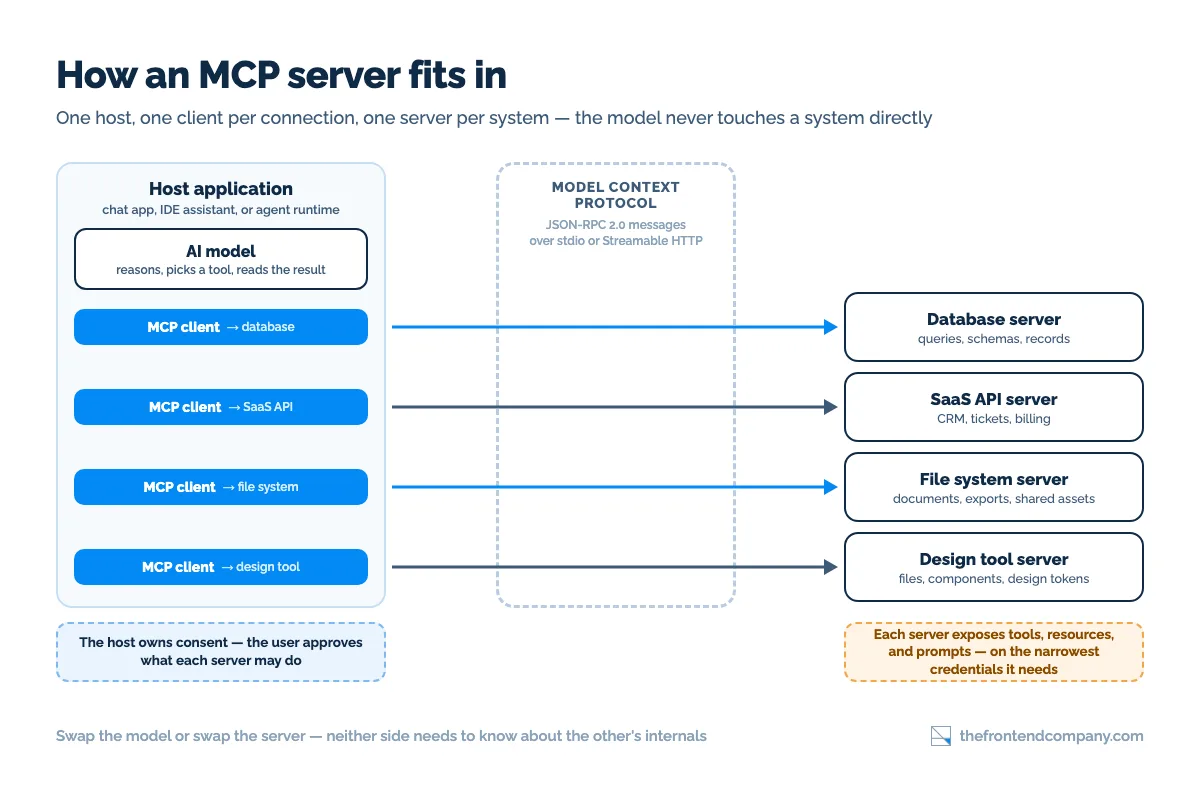
- Host - the AI application the user actually touches: a chat interface, an IDE assistant, an agent runtime.
- Client - the connector inside the host; one client maintains the connection to one server.
- Server - the program exposing a specific system's capabilities. It runs locally next to the host or remotely as a service: the spec's two standard transports are stdio, for a local process the client launches itself, and Streamable HTTP, for anything reachable over the network.
The separation is the point: the server knows nothing about which model calls it, and the model knows nothing about the server's internals. Either side can be swapped without touching the other.
In practice a connection is a handful of JSON-RPC messages: the client asks the server what it offers, gets back a list of tools with names, descriptions, and input schemas, and then sends calls with arguments whenever the model decides to use one. The protocol has been revised several times since launch - the current revision is dated 2026-07-28 - and newer capabilities such as long-running tasks and interactive UI elements ship as opt-in extensions on top of that base rather than replacing it.
What are tools, resources, and prompts?
MCP servers expose three kinds of things:
- Tools - actions the model can take: run a query, create a ticket, render a component. The model decides when to call them; this is where agents get their hands.
- Resources - data the model can read: file contents, schemas, records. Context, not actions.
- Prompts - reusable templates the server offers for common operations with itself.
Most practical servers today are tool-heavy - and most of what people mean by "hooking an agent to our stack" is exactly this: tools over MCP.
Why did MCP servers explode?
Timing and a real problem. Agents got good enough to do multi-step work in 2024-25, which made the integration bottleneck THE bottleneck - every team was hand-wiring the same connectors. An open protocol arrived exactly then, and the adoption that followed was unusually cross-vendor: OpenAI adopted MCP in March 2025, starting with its Agents SDK, and by the end of the year the client list included ChatGPT, Claude, Cursor, Gemini, Microsoft Copilot, and Visual Studio Code.
In December 2025 Anthropic donated the protocol to the Agentic AI Foundation under the Linux Foundation - vendor-neutral governance, with Amazon Web Services, Google, Microsoft, and OpenAI among the founding platinum members. At that point the project reported over 97 million monthly SDK downloads and 10,000 active servers. The entire search demand for "{tool} MCP server" barely existed before 2025. For the architectural view of where a tool layer sits inside an agent system, see AI Agent Architecture - MCP is Pattern 5 there.
What MCP servers exist today?
Practically every category of developer and business tooling: design (Figma's MCP server - our write-up is coming in this series), automation platforms (n8n), project trackers (Linear, Jira), code hosts (GitHub), databases, browsers, file systems, payment and CRM platforms. Three sources in practice: official servers shipped by the vendors themselves, community servers on GitHub and in the official MCP Registry, and in-house servers teams write for internal systems - which is where building your own agent usually leads.
Quality varies wildly across that landscape, which brings up the part most explainers skip.

Transform your UI for peak performance!
🔹
Unlock seamless, high-performance frontend solutions tailored to your business.
🔹
Get an interface that outshines competitors and delights your users.
Are MCP servers safe?
The honest answer: MCP makes connections easy, and easy connections widen your attack surface. The specification says so itself: tool descriptions are to be treated as untrusted unless they come from a trusted server, and the protocol cannot enforce user consent or access control on your behalf. Three rules we apply in our own setup:
- Least privilege. A server gets the narrowest credentials that let it do its job - read-only where possible, scoped tokens always. An agent that CAN drop tables eventually will.
- Tool results are untrusted input. Text coming back from a server - a webpage, a ticket description, a file - can contain instructions aimed at the model. Prompt injection through tool results is a real attack path, not a thought experiment.
- Human gates on irreversible actions. Sending, paying, deleting, deploying - an approval step, whatever the workflow. The protocol won't enforce this for you; your architecture has to.
Run unofficial servers the way you'd run any third-party code with credentials: read it, pin it, sandbox it. What skipping each of these controls costs you, pattern by pattern, is covered in the production trade-offs of our AI agent architecture guide.
Wiring AI agents into your actual stack?
We design MCP tool layers and agentic workflows - least-privilege by default, human gates where they belong - and we run this architecture in our own production pipeline. Book a call and bring the tools you want connected.
FAQ


Pavlo Tyshchenko is COO at The Frontend Company, where he runs operations, delivery, and the internal systems the company runs on - AI workflows, knowledge infrastructure, and hiring. He writes about AI agents, process automation, and the engineering side of software compliance.
Follow the expert:
LEARN MORE